Friday, 6 June 2025

Job Objects

- or How to bundle and control your (child) processes better.


This is partly a follow up to my old post on processes - found here, and an introduction to Job Objects.

A Job Object is a container where you can attach processes to, so that they are controlled within the same context.

To see what processes consist of Job Objects, we could install Process Explorer from Sysinternals from here. 

After installation Jobs by default are not shown, so you must select "Options|Configure Colors...", and enable the Jobs to be shown.

We can see that more and more applications tend to contain more and more processes and bundle these up - browsers and applications like Teams springs to mind.

The list of benefits of a Job Object is long:

- Allow a group of processes to be managed as a one.
- Starting and terminating related external processes.
- They can be named. 
- If main process dies, Windows will terminate the child processes.
- Can be nested.
- Accounting info – I/O, CPU usage
- More and more used – since more application consists of many processes
- They can impose limits on its processes.
- CPU: Maximum processes active, time, Affinity, rate control
- Memory: minimum and maximum working set, commit maximum
- Network: Maximum bandwidth 
- I/O: Maximum rate, read and write bytes 
- UI: User and GDI handles, clipboard access, exiting windows, desktop switching/creation

Below is an example of a Job with limitations:


Example

To illustrate a Job Object I want my "main" application to create a Job Object, create a Process and attach that to the Job Object - I want to pass a callback to get the output from the STDERR steam and if the "child" terminates I also want to be notified.

In the FormCreate I do create an instance of TChildThread - more on that later - with the parameters of the command of the process to run and the callback procdure:

var
  ChildExeName: string;
begin
  // Start Child process and attach to this process via Job Object
  ChildExeName := TPath.Combine(ExtractFilePath(ParamStr(0)), 'ChildProcessC.exe');
  if FileExists(ChildExeName) then
  begin
    ChildExeName := '"'+ChildExeName+'"';
    System.UniqueString(ChildExeName);
    ChildThread := TChildThread.Create(ChildExeName, LogChildError);
    ChildThread.OnTerminate := DidChildTerminateUnexpected;
  end
  else
    memLog.Lines.Add('Error: Not able to find any child process exe to start.');

The OnTerminate event is assigned to the procedure that notifies me of an unexpected termination.

And in the FormDestroy I terminated the child process and close its ProcessInfo handles. Remembering to set the onTerminate to nil prior - since this is the expected termination:

  if Assigned(ChildThread) and (ChildThread.ProcessInfo.hProcess>0) then
  begin
    ChildThread.OnTerminate := nil;
    TerminateProcess(ChildThread.ProcessInfo.hProcess, 0);
    ChildThread.Free;
  end;

Back to the TChildThread:

  TChildThread = class(TThread)
  const
    bufSize = 2400;
  private
    FReadBuf: array [0..bufSize] of AnsiChar;
    FCmd: string;
    FCallbackProc: TOnCaptureProc;
    FProcessInfo: TProcessInformation;
    function GethProcess: TProcessInformation;
    procedure SendLogMsg;
  public
    constructor Create(const cmd: string; CallBackProc: TOnCaptureProc);
    destructor Destroy; override;
    procedure Execute; override;
    property ProcessInfo: TProcessInformation read GethProcess;
  end;

and the callback is of type:

TOnCaptureProc = reference to procedure(const Value:string);

The most interesting thing here is the Execute procedure:

procedure TChildThread.Execute;
const
  secAttr: TSecurityAttributes = (
    nLength: SizeOf(TSecurityAttributes);
    bInheritHandle: True);
var
  rPipe: THandle; // Could PeekNamedPipe this for normal console info
  wPipe: THandle;
  erPipe: THandle; // STDERR pipe
  ewPipe: THandle;
  startupInfo: TStartupInfo;
  dRun, dAvail, dRead: DWORD;
  jobObject: NativeUInt;
  jobLimitInfo: TJobObjectExtendedLimitInformation;
begin
  inherited;
  if CreatePipe(rPipe, wPipe, @secAttr, 0) and 
     CreatePipe(erPipe, ewPipe, @secAttr, 0) then
  try
    FillChar(startupInfo, SizeOf(TStartupInfo), #0);
    startupInfo.cb := SizeOf(TStartupInfo);
    startupInfo.dwFlags := STARTF_USESTDHANDLES or STARTF_USESHOWWINDOW;
    startupInfo.wShowWindow := SW_HIDE;
    startupInfo.hStdInput := rPipe;
    startupInfo.hStdOutput := wPipe;
    startupInfo.hStdError := ewPipe;

After having create the pipes to capture the STDERR (and STDIN and STDOUT), and set these in the StartupInfo structure, we create the Job Object and set some "Limits" for the Job Object.

    jobObject := CreateJobObject(nil, PChar(Format('Global\%d', [GetCurrentProcessID])));
    if jobObject <> 0 then
    begin
      jobLimitInfo.BasicLimitInformation.LimitFlags := JOB_OBJECT_LIMIT_KILL_ON_JOB_CLOSE;
      SetInformationJobObject(JobObject, JobObjectExtendedLimitInformation, @jobLimitInfo, SizeOf(TJobObjectExtendedLimitInformation));
    end;

Then we create the process and assign it to our Job Object

    if CreateProcess(nil, PChar(FCmd), @secAttr, @secAttr, True,   // !!!!
      CREATE_BREAKAWAY_FROM_JOB, nil, nil, startupInfo, FProcessInfo) then
    try
      if FProcessInfo.hProcess <> INVALID_HANDLE_VALUE then
        AssignProcessToJobObject(jobObject, FProcessInfo.hProcess);

And then we read from STDERR, and send any data back via the callback. 

      repeat
     dRun := WaitForSingleObject(FProcessInfo.hProcess, 100);
     PeekNamedPipe(erPipe, nil, 0, nil, @dAvail, nil);
     if (dAvail > 0) then
     repeat
       dRead := 0;
       ReadFile(erPipe, FReadBuf[0], bufSize, dRead, nil);
       FReadBuf[dRead] := #0;
       OemToCharA(FReadBuf, FReadBuf);
       Synchronize(SendLogMsg);
     until (dRead < bufSize);
   until (dRun <> WAIT_TIMEOUT);

And after termination, clean up and close the various handles.

    finally
      CloseHandle(FProcessInfo.hProcess);
      CloseHandle(FProcessInfo.hThread);
    end;
  finally
    CloseHandle(rPipe);
    CloseHandle(wPipe);
    CloseHandle(erPipe);
    CloseHandle(ewPipe);
  end;
end;

One important thing is to remember to set the Inheritable Handles to True - otherwise the handles to the "pipe" streams might not be what you expect - you want them typically to be the same as your "main" process.

Also note, that prior to Delphi 12, a needed Windows API const was missing, so you had to declare that yourself within your code:

const
  CREATE_BREAKAWAY_FROM_JOB       = $01000000;
  {$EXTERNALSYM CREATE_BREAKAWAY_FROM_JOB}

Documentation on Job Objects and of all the limit flag and other parameters found here: https://learn.microsoft.com/en-us/windows/win32/procthread/job-objects

Update: There will be a session at CodeRage 2025 - will put the link here when a replay is avaiable.

/Enjoy


Monday, 24 February 2025

IAM Cloak, without the Dagger

 - or using a Keycloak setup as your Authentication solution in your native Delphi application.


With no reference to melodramatic intrigues, espionage, secret agents or a Marvel crime-fighting team involving experimental drugs, this post will just try to enlighten how fairly easy it is to get started with Keycloak as an authentication backend for your Delphi application.

This post is a continuation of some earlier post about IAM related stuff and my Auth component samples for PingOne, EntraID and now Keycloak on GitHub.

The posts can be found here:

GitHub gist/repos:
The EntraIDAuth was used in my Delphi Summit 2024 session: I can, therefore IAM.

Keycloak

Keycloak is a mature Open Source IAM solution, and I am by not means an expert - but I have been dabbling with some of the other provides - and this is as good as any.

The easiest way to get started is to install a docker container as described in the official documentation here.

There are other options and a lot more to it, but that short guide has you started, and we use that sample as the basis for the KeycloakAuth component, found in the last repo link above. Note that at the time of writing this post, it does only parse an access token for the "uniqueid", and the state parameter is by default added.

The state value is a GUID (or should I say UUID) - so to get "proper" UUID, I end up doing this:

if FUseState then
begin
  FStateValue := TGUID.NewGuid;
  URL := URL + '&state=' + GUIDToString(FStateValue).Trim(['{','}']).ToLower;
end;

Using the state parameter in the authorization code flow, helps to check that the client value sent matches the value in the response - to mitigate CSRF/XSRF (Cross-site request forgery) attacks. After that initial check one should then check the nonce given within the id_token.

But getting ahead of myself - to use and play around with my KeycloakAuth component - get it from GitHub as mentioned above - and install the component in the IDE (Delphi 12 package in repo).

As any of my other Auth components, this is based of TWebBrowser - and I hear you ask why not TEdgeBrowser? Well I had done some things similar years back before Edge was a thing, but since I do strongly suggest that the "SelectedEngine" property is set to "EdgeOnly" - TWebBrowser does internally use a TEdgeBrowser. It does mean you do need to install the Edge WebView2 SDK, and deploy the correct dll. Read all about it here.

Create a new VCL application and drop a KeycloakAuth component, align to client and set the following properties:

    RealmName = 'myrealm'
    AuthPath = 'http://localhost:8080/realms/'
    ClientId = 'myclient'
    RedirectUri = 'http://localhost:1234'
    AuthEndpoint = '/protocol/openid-connect/auth'
    TokenEndpoint = '/protocol/openid-connect/token'
    Scope = 'openid'
    UseState = False
    ResponseType = 'code'
    UserIdClaim = sub
    OnAuthenticated = KeycloakAuthenticated
    OnDenied = KeycloakDenied

Add an OnAuthenticated and OnDenied - like:

procedure TForm6.KeycloakAuthenticated(Sender: TObject);
begin
  ShowMessage('Welcome '+KeycloakAuth1.GreetName+'!'+
    sLineBreak+sLineBreak+'You have been authenticated as userId:'+
    KeycloakAuth1.UserId);
end;

procedure TForm6.KeycloakDenied(Sender: TObject);
begin
  ShowMessage('You have not been authenticated!');
end;

In the forms FormShow event call the components Authorize procedure, to start the flow.

I will add more capabilities to the component - such as nonce and code challenge, and cover all OpenID Connect response_type combinations.

To get a good grasp and overview of the OpenID Connect flows - take a look at this Medium post.

Happy 30th anniversary - Delphi! and see you at Delphi Summit 2025.

/Enjoy

Saturday, 13 January 2024

Splitters Helpers

 - or how to find ways to add own helpers and keeping existing helpers.


Wanted to do a pun on Finders Keepers, but failed - so this post is a sample on how to add your own record helper - in this case for the string type.

Delphi/Object Pascal does not allow for multiple helpers for the same type to be available at the same time.

So in my little example I wanted a string function that would split a string by a char, but up till a given max length.

A scenario for that use could be if you need to feed a system that has limited fixed size fields, spanning over more fields - CompanyName1, CampanyName2 only being 30 chars each. And for readability and UI, you also need to consider not to split mid-word.

To overcome the issue with  the one helper active per type, defined your own matching type:

MyString = type string;

Define the new record helper for that type with its function:

MyStringHelper = record helper for MyString
  function SplitMaxProper(const ch: char; const len: Integer): TArray<string>;
end;

Since we also want to use the normal string helpers within the helper function, we need to do some casting when referring to the helpers type itself:

function MyStringHelper.SplitMaxProper(const ch: char; const len: Integer): TArray<string>;
var
  sl: TStringList;
begin
  var sidx := 0;
  var done := False;
  sl := TStringList.Create;
  try
    while (not done) do
    begin
      var delta := string(Self).LastIndexOf(ch, sidx+len, len);
      if (delta = -1) or (string(Self).Length-sidx <= len) then
      begin
        sl.Add(Trim(string(Self).Substring(sidx)));
        done := True;
      end
      else
        sl.Add(Trim(string(Self).Substring(sidx, delta-sidx)));
      sidx := delta;
    end;
    Result := sl.ToStringArray;
  finally
    sl.Free;
  end;
end;

And when using the new string helper we do need to cast to get to our new function:

procedure TForm6.btnSplitClick(Sender: TObject);
begin
  meSplitText.Clear;
  var len := StrToInt(edSplitLength.Text);
  var str := MyString(edTextToSplit.Text);
  meSplitText.Lines.AddStrings(str.SplitMaxProper(#32, len));
end;

Disclaimer: The code is done so that it does fix better in the narrow width of my blog layout, and the function might also need some optimization :)

A note on the LastIndexOf string helper functions, the current official documentation seems to me a bit unclear:

StartIndex specifies the offset in this 0-based string where the LastIndexOf method begins the search, and Count specifies the end offset where the search ends.

Do remember that the search in this case, of cause goes from right to left - so StartIndex would normally be the length of the string.

I started with a Stephen King book title pun, so I should also comment on the quote used in the image shown - a quote from the brilliant author Tom Holt and the book The Portable Door - which is highly recommended, even if you have watched the movie adaptation, which is also good - but different - since adapting Tom Holt's books is no trivial task.

/Enjoy


Tuesday, 2 January 2024

Just Ping someone!

- or a component for Ping Identity's authentication within your Delphi application.


It has often been the rule that native applications either authenticate the user by current OS user or by an application-centric user and role model - but that might for multiple reasons not be good enough anymore.

The old AD or LDAP lookups are being replaced by cloud IAM platforms, to control and secure the authentication of the identity of the user.

After the user is authenticated (and is authorised "access" your application), the application-centric roles flow can continue as-is.

One of these IAM cloud provides is PingIdentity, and they have a fairly extensive Postman collection for their PingOne Platform API - found here. Their developer documentation is also very useful - found here.

I have previously used various ways against various providers, but it seemed that when testing against PingOne with MFA enabled (Multi-Factor Authentication - which might include the annoying phone thing - that everyone uses) - I was hit by either a CORS issue or something else.

When using an OAuth2/OpenID Connect authentication, it does require that you setup and use a redirect uri, to tell the provider who is locally listening/waiting for the "response".

The idea with this type of authentication, is that the flow is handled securely within a web browser session, and the client does at no point in time know the login credentials - only when the user is authenticated do we need an "id token". So no "local" storage/handling of "passwords".

The listener part and possible timeouts has always annoyed me, so it seemed based on the flow, that I could handle it differently by just intercepting the local redirect call with the auth code - when the user is authenticated on the PingOne side - to get the id token needed.

Implementation

The TPingOneAuth component is a descendant of standard TWebBrowser overriding the IDocHostUIHandler interface, and adding a some properties.

The GetHostInfo override is to ensure that all redirects in the browser component is triggering the OnBeforeNavigate2 event - which then on the redirect auth code call, will get the wanted id token.

function TPingOneAuth.GetHostInfo(var pInfo: TDocHostUIInfo): HRESULT;
begin
  pInfo.cbSize := SizeOf(pInfo);
  pInfo.dwFlags := 0;
  pInfo.dwFlags := pInfo.dwFlags or DOCHOSTUIFLAG_NO3DBORDER;
  pInfo.dwFlags := pInfo.dwFlags or DOCHOSTUIFLAG_THEME;
  pInfo.dwFlags := pInfo.dwFlags or DOCHOSTUIFLAG_ENABLE_REDIRECT_NOTIFICATION;
  Result := S_OK;
end;

The id token is then parsed using Pablo Rossi's brilliant JOSE and JWT library, that might as well have been done using a call to one of the PingOne's Token Introspection endpoints.

Since we do need an user id - the OpenID Connect scope must include profile also.

To parse the custom claim a custom TJWTClaims class is added, containing the profile claims we want to read.

TPingOneClaims = class(TJWTClaims)
// Adding some given by the OpenID Connect scope: profile
private
  function GetPreferredUsername: string;
  procedure SetPreferredUsername(const Value: string);
  function GetGivenName: string;
  procedure SetGivenName(const Value: string);
  function GetFamilyName: string;
  procedure SetFamilyName(const Value: string);
public
  property PreferredUsername: string read GetPreferredUsername write SetPreferredUsername;
  property GivenName: string read GetGivenName write SetGivenName;
  property FamilyName: string read GetFamilyName write SetFamilyName;
end;


Usage

Install the TPingOneAuth component in the Delphi IDE, and set the library path - business as usual.

There is a small sample application in the GitHub repo, but steps are at follows:

Drop or Create the TPingOneAuth on a form, setting following properties:

  • AuthEndpoint: /as/authorize
  • AuthPath: https://auth.pingone.eu/
  • ClientId:
  • ClientSecret:
  • EnvironmentId:
  • RedirectUri:
  • ResponseType: code
  • Scope: openid profile
  • TokenEndpoint: /as/token
All these values are found in the PingOne console, under the application you setup as a "authorization" reference to your native Delphi application.


Add code to the OnAuthenticated (and OnDenied) event(s) - were on a successful authentication the public properties UserId and GreetName can be useful.

To start the authentication just call the Authorize method - and with MFA enabled, you will see the prompt bellow, once you initially have given your credentials.


After finding your phone, and having swiped to authenticate in the PingOne mobile companion app, the OnAuthenticated event is called.


The code for the component and the sample is found here.

A thing to note:

When having MFA enabled - and you need to pair a device the first time around - the url Ping provides does contain some "strict mode" Javascript that IE will prompt you about twice, the solution to this is to set the SelectedEngine property to EdgeIfAvailable or EdgeOnly and deploy the EdgeView2 Runtime (WebView2Loader.dll) which can be found in GetIt as the EdgeView2 SDK.

/Enjoy


Sunday, 22 October 2023

Use(s) less

- how to visualize your uses - for un-needed and wrong scoped units.

The "Uses" plugin installed and feed with a PAL report.

Disclaimer: Even if the above picture shows my usage of the code in the current state - the code/plugin is by no means done and complete - but I put this out for others to tinker with and benefit from.

One of the things that has been on my list of wish's for the Delphi IDE since forever, has been the ability to identify which units in your uses clause is either not needed, or should/could be moved from the interface section to the implementation section.

There seems to be good reasons for that feature not to be a 100% correct in it assumption in what is needed and what could be moved, and that might also be the reason Embarcadero has not included that feature yet, but..

I only need something that is good enough, and that can help me make the decision on what to clean up.

There are some third-party tools that attempt to do that, one being Peganza's Pascal Analyzer - and the free Lite version is sufficient to what I attempted to try here.

With the new CodeEditorEvents added to the OTAPI, it is now a lot easier to change the rendering of the code editor window in a safer way.

So this is what you need to do to get to a similar result - you need to download and install Pascal Analyzer (Lite).

Setup a project to handle your Delphi project, and you can optimizer the output from the analysis to only output the Uses.txt with only the Usage (USES1) - since that is the only needed.

I should mention that people more clever than me - could probably utilize the LSP or DelphiAST (or whatnot) - to make a more elegant solution - and they should :D.

So the prerequisite for the plugin is in place - a Uses.txt to parse. And to "refresh" the Uses.txt - you would have to run C:\Program Files\Peganza\Pascal Analyzer Lite\palcmd.exe <MyDocuments>\Pascal Analyzer Lite\Projects\<Myproject>.pap again.

The plugin contains code to parse Uses.txt and created a dictionary where each unit/module has a list of flagged units.

That dictionary is used to get the uses statements for the current unit, so that the renderer can either gray out or strikeout the unit name in the Uses clauses'.

As mentioned, the state of the code is more a prof of concept and does include code that is more a comment and an intent to what I had planned at that point of time - but it has now been laying around since summer, and I will not get this perfected in foreseeable future so it will have a better life set free.

The code can be found here: https://github.com/SteveNew/CodeEditorPaintTextPAL


Saturday, 18 February 2023

IAP Client, therefore IAM

- or creating a simple Google IAP client using JOSE and a service account key file.


Google offers a massive amount of services and APIs to these, and I doubt anyone has the full overview unless they are in that domain naming space 24/7, and the same would be true for Amazon, Microsoft and other offerings.

In this example, I am using Googles IAP (Identity-Aware Proxy) to get an OIDC token that can be used to authorise the requests sent by a service account.

And a disclaimer: This is a conceptual example, for more secure and correct use one should not store any form of keys - so for that look into something like Workforce identity federation - which gives the same short-lived OIDC tokens, with the help of an identity provider. But for the purpose of the example - less is more.

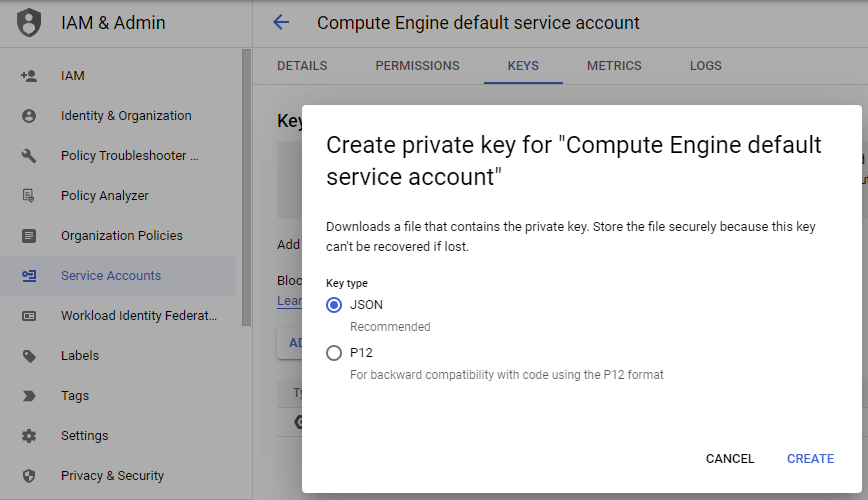
First you would need to create or get the service account key file by using the Google Cloud console to create a new key for the service account, and download and store that in a safe place. The Grijjy guys did a similar example years back, where they used a PEM key based from the P12 file.

I just created a class to load our json key into to extract the values needed, and by using the JOSE library, I did a customer header and claim/payload - which was signed as the example given by the bash shell script in Googles documentation here: Get OpenID Connect Id token from key file.

Since the signing requires RS256, it does disqualify some of the other libraries, but JOSE does support that.

The Google API Client libraries and Cloud Client Libraries tend to use what they call the Application Default Credentials (ADC) strategy, and to mimic that, I added a bit of code that should cover the 3 desktop OSs.

You can read more about ADC here: Google Application Default Credentials

One requirement of the signing is the OpenSSL libraries - JOSE does use these. You could of course also "just" use the EVP_DigestSignXXX functions from the SSLEAY library, and wrap what you needed, but JOSE does such a nice job of that, so why bother.

Adding a scope will give an access_token, whereas without it you will only get the id_token which is the OIDC token.

I did add an expiration check on the OIDC token, and it does seem to do the job of not having to request the token more than needed - but it might not be the perfect way.

The OIDC token is used as a bearer token for the actual requests to the service the proxy works for, so I added some HTTP methods as sample - and they just return an IHTTPResponse interface.

So an example of use would be something like:

uses
  System.Net.HttpClient,
  FbC.IAPClient;

procedure TForm1.Button1Click(Sender: TObject);
const
  cSERVICE_ACCOUNT_KEY='lustrous-stack-342709-93cfcb2a8000.json';
  cIAP_CLIENT_ID='108584532133305403517';
  cURL='https://mytest.com';
var
  IAPClient: TIAPClient;
begin
  IAPClient := TIAPClient.Create(cSERVICE_ACCOUNT_KEY, cIAP_CLIENT_ID, cURL);
  try
    Memo1.Text := IAPClient.IdToken;
//    Memo1.Text := IAPClient.Get('/companies').ContentAsString();
  finally
    IAPClient.Free;
  end;
end;

The IdToken property should not be public, and the client code is just meant as a starting point - since it does solve the painful bit - signing and authentication.

The code for the conceptual IAPClient can be found as a gist here: Delphi Google IAPClient

Requirements are also:

JOSE library: https://github.com/paolo-rossi/delphi-jose-jwt

The appropriate OpenSSL dlls: https://github.com/IndySockets/OpenSSL-Binaries

An implementation of TOAuth2Authenticator with this might have been a good idea, but ...

Well I hope it will at least get you on the right track, if you need to go through an IAP. There is no check for an unsuccessful attempt to get the OIDC token - it will just return an empty string - so that is meant as homework.

/Enjoy

Wednesday, 22 June 2022

A SET up

- or how the for-in statement changed  recently.


Before Delphi 10.4, the statement:

for integer in [] do 

would operate on a set, but since then it now operates on an array. Which then also means a bit of different behaviour.

I had missed this change completely, and only recently gotten aware of it since we had a build issue - mixing source from different IDE versions. (BTW: Do not do that).

Since it previously worked on a set - the "list" when traversed would be an ordered list of values with an ordinal value no bigger than 255, and no more than 256 elements, that is now changed. I will list a few examples - illustrating the pre-10.4 behaviour compared to 10.4 and later.

Duplicates and ordering


var
  i: integer;
begin
  for i in [42, 10, 42, 3, 42, 7] do
    WriteLn(i.ToString);
end.

returns:

10.4+: 42, 10, 42, 3, 42, 7
pre10.4: 3,7,10,42

Range


var
  i: integer;
begin
  for i in [42, 365, MaxInt] do
    WriteLn(i.ToString);
end.

10.4+: 42, 365, MaxInt
pre10.4: Does not compile - In 10.3 you get an E1012 Constant expression violates subrange bounds (earlier you might also get an E2024)

To solve that you could replace it with something like:

uses
  System.Types,
  System.SysUtils;

var
  i: integer;
begin
  for i in TIntegerDynArray.Create(42, 365, MaxInt) do
    WriteLn(i.ToString);
end.

I do think the change is a step up, and does syntax-wise work more like one would expect, so a change for the greater good - but do be aware of the change of behaviour. Another benefit of a newer version is the usage of inline variable declaration and type inference, like in this case:

for var i in [42, 10, 42, 3, 42, 7] do
    WriteLn(i.ToString);

/Enjoy

Thursday, 14 October 2021

A Taste of WINE

- or how to detect if your Windows application is run under a flavor of WINE

It has been a while since I mentioned what has been going on with Siege Of Avalon - and the short story is that I have been involved in getting the game re-released on GOG and Steam - the long story deserves a longer post another time.

We currently have a bigger update/patch planned - that would be the 4th - since its re-release in April 2021 - but it is not finalized what goes in and what not.

But one of the minor things, is trying to make the game more Steam Play friendly - so that basically just allowing custom ddraw.dll and disabling a few things when run under Wine/Proton - so that the game is playable without the need to jump through hoops like winetricks and  protontricks.

Since these compatibility layers are meant to be transparent to the windows application, one would need to actually in some detect if running under Wine, luckily there is an extra bit in the NTDll.dll - the wine_get_version function.

So dynamically loading of the Dll, and try to get the address pointer of the function will reveal if your plain Delphi VCL Windows is run under Wine on Linux (or other Wine supported platforms).

The code for the simple test pictured:

procedure TForm10.Button1Click(Sender: TObject);
var
  dll: HMODULE;
  get_WINE_version: function: PAnsiChar;
begin
  dll := LoadLibrary('ntdll.dll');
  if dll<>0 then
  begin
    @get_WINE_version := GetProcAddress(dll, 'wine_get_version');
    if Assigned(@get_WINE_version) then
      Label1.Caption := 'Running under ' + get_WINE_version()
    else
      Label1.Caption := 'Pure ol'' Windows';
    FreeLibrary(dll);
  end;
end;

This is by no means the real deal, but if it helps bringing an existing application run on a different platform and making it aware of that - then it might be helpful.

A more "correct" way to migrate existing VCL applications could be https://www.crossvcl.com, but in this case that is not doable - since not a standard Delphi VCL application.

But as you can see below this detection short-cut can help create an experimental build of Siege Of Avalon that is running on Steam Play out of the box. AS-IS.

Siege of Avalon launched under Steam Play on Linux - also showing the new live-mapping.

Please support the nice publisher of this re-released classic old game, and their willingness to keep releasing the Delphi code of the GOG/Steam releases.

/Enjoy

Thursday, 9 September 2021

My favorite %11 new things in Delphi 11 Alexandria

- or all things "eleven", watch out for dialects.

With the public release of Delphi 11 (and RADStudio and C++Builder) today, I would like to share my %11 initial favorites in the new release.

%01. Styled Form designer

Together with the IDE HighDPI support, it is great that the gap between the running UI and the UI while designing has been reduced, and keeps in my opinion Delphi IDEs the best to design visual applications - whether it is on desktop OSs or mobile OSs.

%10. HTTP/2 support

I am looking forward to start experimenting with this, and see how much benefit and performance it will give when taking advantage of fully.

%11. Remote Desktop Support improvement

In this world where more people are coming to their senses, and wish to work remotely, focus on improving the IDE experience with remote connection is nice. And the things done can also benefit the applications build.


But there are many other things that not even a list of $11 things would cover it, and I am really looking forward to also experience to the various optimizations and running the IDE in HighDPI on my old Surface Pro.

Go EMBT :)

There is one slightly annoying thing that might split the Delphi community - adding to the list of:

- Is Delphi pronounced /del·fai/ or /del·fee/?

- Does "then begin" go on together on the same line?

- FreeAndNil?

and now this to split the community further and create fractions:


https://youtu.be/BOUTfUmI8vs

Well the above was just an excuse for me to include that funny Scottish sketch - no harm done I hope.

BTW: If you wonder about the % prefix - the it is the prefix for binary literals adding in Delphi 11.

/Enjoy


Saturday, 22 May 2021

VAT's in it for me? - or I call my layer.

 - or a shout-out to the various services of apilayer.com


Sorry about the intended pun in the title - but it will all make sense.

Have you ever wanted to know the various VAT rates in the EU - no? - well neither have I, because it might put me in a bad mood, but it fits the intended pun for the post, and I also wanted to show how it is done from from Delphi.

The mother company of Embarcadero, Idera acquired another company early this year - this time apilayer.com, which provides numerous "simple" cloud-based API services - among these are:

  • IP geolocation and reverse lookup
  • Language detection
  • Mail address validation
  • Phone number validation
  • Flight tracking
  • Currency conversion and rates (including crypto currency)
  • Weather data and forecast
  • News, Headline and Stock apis
  • Conversion PDF and scraping
But go to https://apilayer.com/, and read more about their various layers and tiers for these.

We will in this short demo look at the vatlayer - which does EU VAT stuff.

So I started by signing up for the free tier on https://vatlayer.com/ - which gives you an API access key and access to a dashboard. As always do not share the access key - just saying.

Now you can fire up Delphi, create a new application and either use the REST Debugger or just manually throw in the REST component or create runtime - what you prefer.

I just threw in a edit control and a couple of memos and buttons, as seem above. And then I added an parameter on the RESTClient with the access_key - since I wanted to clear the request parameters on the RESTRequest, but keep the access_key. And set the BaseURL property to http://apilayer.net/api.

I just took two of the methods/resources from https://vatlayer.com/documentation - so the VAT lookup button looks like this:

var
  json: TJSONValue;
begin
  Memo1.Clear;
  RESTRequest1.Method := rmGET;
  RESTRequest1.Resource := 'validate';
  RESTRequest1.Params.Clear;
  RESTRequest1.AddParameter('vat_number', LabeledEdit2.Text, pkGETorPOST);
  RESTRequest1.Execute;
  if RESTResponse1.StatusCode=200 then
  begin
    json := RESTResponse1.JSONValue;
    Memo1.Lines.Add(json.GetValue<string>('company_name'));
    Memo1.Lines.Add(json.GetValue<string>('company_address'));
  end;
end;

..and the VAT rates for HU (since they have a higher VAT rate than DK :D) button looks like this:

var
  json: TJSONValue;
begin
  Memo2.Clear;
  RESTRequest1.Method := rmGET;
  RESTRequest1.Resource := 'rate';
  RESTRequest1.Params.Clear;
  RESTRequest1.AddParameter('country_code', 'HU', pkGETorPOST);
  RESTRequest1.Execute;
  if RESTResponse1.StatusCode=200 then
  begin
    json := RESTResponse1.JSONValue;
    Memo2.Lines.Add(json.Format());
  end;
end;

There nice twists to these - by IP address or get list of rate types - and if combining these services by apilayer.com - I could make a speeding white-van "whistle-blower" mobile app - since all company owned registered vehicles in DK - need to have their VAT numbers on their fleet.

So I could lookup the company and their address, get their phone number by a different api layer - and then call and tell on them - MUHAAHAAAHAA (evil laughter)

..or maybe I should just create something useful and fun.

And the best part about writing this post, I now learned that Denmark has only the second highest VAT rate in EU :D

/Enjoy


Monday, 15 February 2021

Closing in on Modal Jump Lists

- or getting a WM_SYSCOMMAND to a modal dialog.

An idea that initially seemed clever, has been haunting me a bit lately - I did put a modal dialog into a project before the main Application block (Initialize .. Run). Shame on me.

So the code looks similar to like this:

if (TfrmLaunchSetting.Execute = mrOK) then
begin
  Application.Initialize;
  Application.MainFormOnTaskbar := True;
  Application.Title := 'MyApplication';
  Application.CreateForm(TfrmMain, frmMain);
  Application.Run;
end;

and the TFrmLaunchSetting.Execute is just a class function returning the ModalResult, from its ShowModal.

But here comes the issue at hand - the Close Window in the task bars Jump List sends a WM_SYSCOMMAND that goes to the system menu in the main window - but if a modal form is shown the main window is disabled - and in this case I do not even have a main form yet.

So TApplication.HookMainWindow to the rescue - that would enable me to intercept messages sent to the main form - and act upon these.

So in the FormCreate of my modal dialog I hook the my hook function up like this:

Application.HookMainWindow(AppHookFunc);

And on FormDestroy I do the following:

Application.UnHookMainWindow(AppHookFunc);

The AppHookFunc goes as follows:

function TfrmLaunchSetting.AppHookFunc(var Message: TMessage): Boolean;
begin
  Result := False;
  if Message.Msg = WM_SYSCOMMAND then
  begin
    PostMessage(Handle, WM_CLOSE, 0, 0);
    Result := True;
  end;
end;

This way modal dialogs can react to Windows messages that normally be intended for the main form.

There are probably side-effects - but the issue at hand is solved - for now?

BTW: Yesterday was Delphi 26th birthday - I did not forget - but I am still wrapping up the present. Stay tuned.

/Enjoy

Wednesday, 30 December 2020

It deploys and runs - what a Big Sur prize

- or the initial steps to get a Windows IDE to run cross-platform using CrossVCL.


Sorry about the pun, and I should also mention that this project is WIP, so no workable release/code yet.

Update: In the original image above the language selection was broken/disabled. Read the update in the end of the post on the changes I decided to do to makes this work better overall.

A few days back was a new update of CrossVCL announced in my email - for the lifetime license I had bought years earlier - which triggered an idea.

Saturday, 28 November 2020

A Set back?

- or how could I forget some set operators.


Recently a colleague of mine asked me to review some old code, and a line similar to the one below pop into my view as strange:

if (doorStates * [dsClosed, dsUnlocked] <> []) then

It had been so many years since I had used that specific syntax, that I completely forgot about some of the set operators in Pascal and Delphi - so I thought I would write up a small post on Sets in Pascal/Delphi.

In regards to the silly doorStates example above - here is a little riddle: When is a door not a door?

Saturday, 31 October 2020

Not exactly Kierkegaard - pun intended

- or the books on Delphi keep coming.

Well the pun in the title would probably need a bit of explaining, so the reference is to Søren Kierkegaard (1813-1855) - the Danish philosopher, theologian, poet, social critic and religious author who is widely considered to be the first existentialist philosopher - but his surname is also pronounced as the Danish word for graveyard or churchyard.

I sometimes still hear people say, that nothing is happening in relation to Delphi in general or more specific in the Delphi book area - but that is not true.

It might have been many years since a Danish book on Delphi was published - but there where many in the early days - I had only 2 of the 15-16 published, all the rest I had were in English. So the scene for Danish Delphi books does feel like a "kirkegård".

And it is all my fault - I do prefer my technical books (and my software) in English, and I am sure most Danish developers feel the same.

But when you look at the number of English books that has been published the last couple of years - the technical quality, the passion, level of detail and diversity of topics matches greatly what also has been going on in the rest of the Delphi community - if you haven't noticed you might be looking in the wrong places.

Fellow Embarcadero MVP Patrick Prémartin has started to setup a nice site called delphi-books.com - some books still need to be added at the time of writing this. - no books in the Danish section yet - but covers are scanned. Update: Patrick has uploaded the info and covers I provided him with - and also published an extensive open-data API for the site.

I know Patrick has grouping by "year published" on his to-do list, that will help indicate how much great content has been published in traditional book form the latest years - so a big thanks to all the authors and publishers - for keep doing this non-trivial task of writing books.

It is almost 30 years since I co-authored two books on Paradox DOS - in Danish and just prior to Paradox Windows was launched - they were not bestsellers btw 😁. But I still remember the tolls it took on everyone, and still surprised that my then to-be-my wife, stayed.

/Enjoy some of these great books.

Wednesday, 30 September 2020

Good on ya, mate!

- or a shout-out for Alister Christie's new book: Code Faster in Delphi.

I just got a chance to review the first of a series of new books about Delphi from Alister Christie, and even if it is a short book - 160 pages - it is perfect and on the spot - looking forward to the next in the series.

You can get the book here: https://leanpub.com/codefasterindelphi - just take a look at the Table Of Content - a lot of great stuff.

Alister Christie has been doing his LearnDelphi.tv for many years - and his 150+ short videos are always to the point - on topic and precise - at least those I have seen :)

And speaking of video - watch his promotional video for the book - always fun and this one has WordStar bits :)

I will get my dead tree version as well - even if shipment cost probably will exceed the price of the book - but I want this nice books content and cover on my bookshelf.

Speaking of cover - as a little bonus I found this on 99designs: https://99designs.dk/book-cover-design/contests/code-faster-delphi-book-1018068 - so if anyone has a potential writer in them, this shows one process of getting a nice cover selected.

It has been more than 25 years since I last wrote a book - even if self publishing and cover contents are now a thing - it is not a trivial task - as I remember it, so well done - and thanks.

/Enjoy Alister's new book.

Monday, 31 August 2020

Hygge by the fireside

- or a fireside chat with Jim McKeeth


End April in the evening Jim and I had a fireside chat, which should had been in front of our masonry oven - but I ended up having it from my home office.


You can see the chat here - it is a bit long but I think we had fun, and to help you through it, I have done this post as a commentary track, and put a bit more details in various places.

And the word hygge now seems to have gotten into the Oxford English Dictionary - but still pronounced wrong :)

Friday, 31 July 2020

I am no Charles TDickensionary<>

- or a few TDictionary<> tricks.


One of my favourite classes in Delphi is TDictionary<> - might be because it resembles a database table which can have composite keys, and I have always been a ClientDataset/VirtualTable/FDMemTable fan-boy :)

I do not get to use the memTables that much i recent years, and the RTL generic collections also got better - while not on par with third party collections like Spring4D - which I also not get to use much.

I recently had a task where I had to transform some code that was collecting data from an external source, that provided data in a way that multiple iterations had to be done, before each row/item was complete - since data was coming in subsets per field/property. TDictionary<> to the rescue.


Monday, 27 July 2020

TTreeview your TOutline

- or migrating a TOutline to a TTreeview many years too late.


HighDPI themed Delphi 10.4 TOutline and TTreeview

The task to migrate from a working old TOutline to a TTreeview was long overdue in a small program I almost use daily - and its code had not really been touched since it was created.

TOutline was included in Delphi 1 back in the Win 3.1 days, and since Windows did not have any Treeview/Outline in its common controls it was purely VCL, not a wrapper.

It has for many years been advised to not use TOutline for any new projects, but instead use TTreeview or similar - but once in a while I do bump into this component - and this time I thought I would write a small and incomplete migration guide.

Thursday, 18 June 2020

D&D in Delphi source code?

- or does your device support Phone, Tablet or Elf?!


While looking through some of the RTL source code, in the quest for the "Tablet" mode (see my previous post from yesterday) - I stumbled upon the TDeviceInfo.TDeviceClass enum.

Wednesday, 17 June 2020

A cure for Win10 in Tablet mode

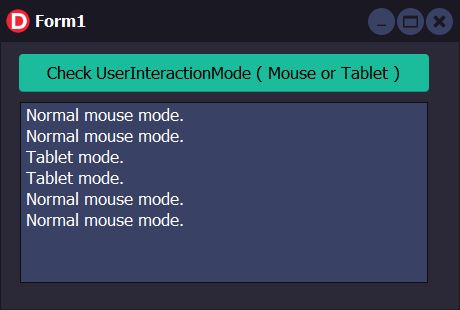
- or how to detect tablet mode in Windows 10 from Delphi.


Sorry about the cure-tablet pun, but Windows 10 is not able yet to enter Pill mode.

This small post is actually also about wrapping Win10 SDK apis, that might not have been fully implemented as Delphi classes/interfaces or are missing because of their little use - which incidentally is that ones I often miss.

I was getting a bit frustrated refactoring some old code, and thought that it would be fun to add a Windows 10 feature to the project instead - and since I was sitting on an old Surface - I could switch that into "Tablet" mode.